

How to Receive USD Payments from Upwork Without a US Bank Account
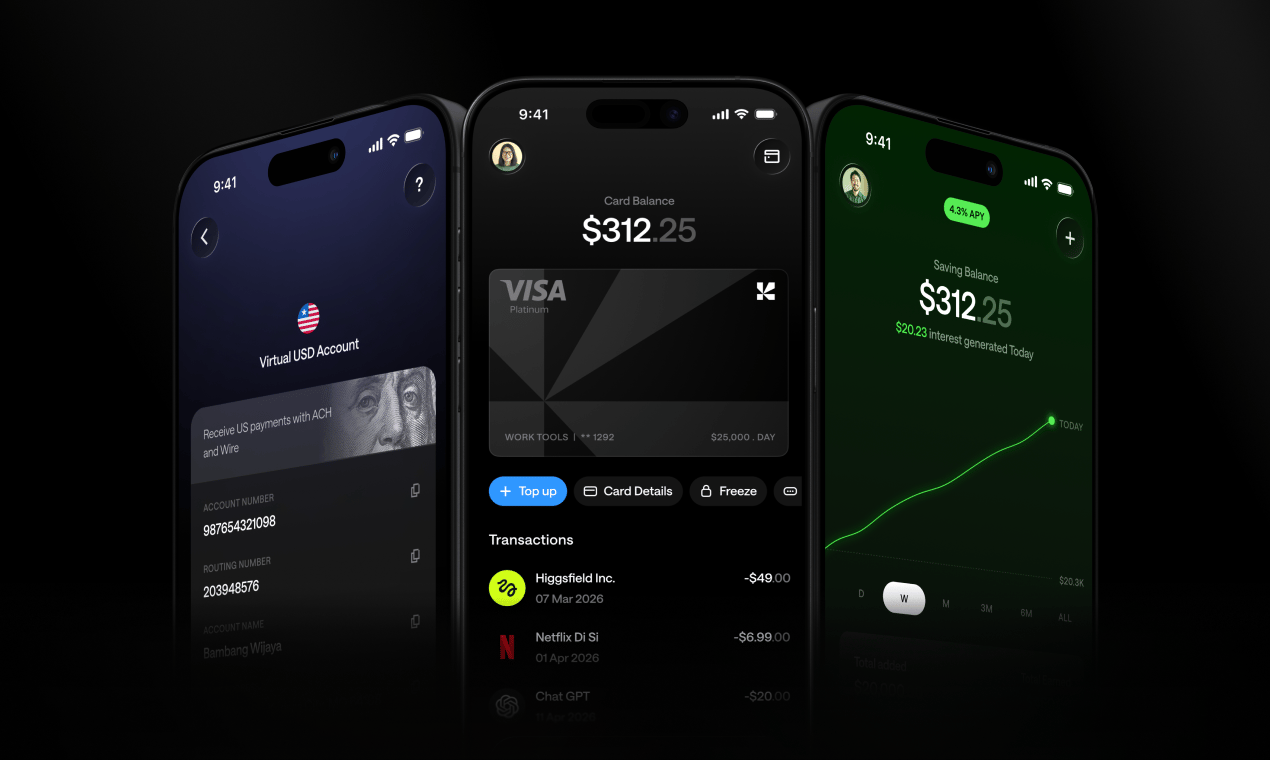
Step-by-step guide for international freelancers to receive Upwork payments via ACH without needing a US bank account.
You finished the project. The client approved the work. Upwork shows the funds are ready. Then you hit the wall: your local bank rejects the transfer, a conversion fee eats 5% before you see a cent, or the payment bounces entirely.
If you're a freelancer in Nigeria, the Philippines, Pakistan, or India, this isn't an edge case. It's the routine. And it's fixable.
This guide walks you through exactly how to receive USD payments from Upwork without a US bank account — what Upwork actually supports, and the simplest way to get a working USD account set up today.
The Problem with Upwork Payouts Outside the US
Upwork offers several withdrawal options for international freelancers: local bank transfer, wire transfer, Payoneer, and ACH direct to a US bank. ACH is the fastest and cheapest — but it requires a US bank account. Most freelancers outside the US don't have one.
Local bank transfers sound convenient until you check the fees. Wire transfers can run $15 to $30 per transaction, and your bank may stack an additional conversion spread on top. Payoneer works in many countries but brings its own withdrawal fees and exchange rate margins.
The deeper problem is currency control. When your local bank receives USD and immediately converts it to naira, pesos, or rupees at whatever rate they feel like, you lose control of your money before it even lands. In high-inflation economies, that timing matters enormously.
What Upwork Actually Supports for International Freelancers
Upwork's payment rails are straightforward once you understand them:
- ACH is the cheapest option and works only with US bank accounts (routing number + account number)
- Wire transfer (SWIFT) works internationally with any account that has a valid SWIFT/BIC code
- Payoneer is a third-party option Upwork integrates directly
Here's the key insight: Upwork doesn't care where you physically live. It cares about the account details you provide. Give Upwork a valid US routing number and account number, and it will send your payment via ACH — fast and cheap — regardless of your passport.
That's the opening. You don't need to move to the US. You need a US account number.
The Easiest Fix: A Virtual USD Account
A virtual USD account gives you real US banking details — a routing number and account number — without requiring a US address, Social Security Number, or any form of US residency.
Once you have those details, you add them to Upwork's payment settings exactly like any US-based freelancer would. Upwork sends the payment via ACH. The money lands in your virtual account. You access it from wherever you are.
The balance stays in USD. No forced conversion. No bank deciding the exchange rate for you. You choose when and how to convert, spend, or send.
This works for Upwork and applies equally to Fiverr, Deel, Toptal, YouTube, and Google Ads. Any platform that supports ACH or Wire payouts can send to a virtual USD account.
How Kosh Works with Upwork
Kosh gives you a virtual USD account you can connect directly to Upwork. No US address needed. No SSN required.
Here's what that looks like in practice:
- You get a US routing number and account number to add to your Upwork payment settings
- Upwork sends your earnings via ACH or Wire
- Your balance is held in stablecoins (USDC or USDT), keeping it at USD value without the volatility of other crypto
- You spend directly from that balance using a virtual or physical Kosh card — Apple Pay and Google Pay both work
- You withdraw to your local bank in Nigeria, the Philippines, Pakistan, India, or 90+ other countries
- You send money globally by email, with no crypto wallet or bank account required on the receiving end
The stablecoin infrastructure is the engine running underneath. What you actually experience is a USD account that works.
Kosh also covers the tools freelancers pay for every month: AWS, Google Cloud, OpenAI, Figma, Canva, Netflix. The same account that receives your Upwork earnings can handle your entire SaaS stack.
On top of that, the rewards program gives you 5% cashback on hotel bookings and 10% reward points on eligible card spend. If you travel between contracts or book accommodation for client work, that adds up quickly.
Step-by-Step: Setting Up Upwork Payouts with Kosh
Step 1: Create your Kosh account
Download the Kosh app on iOS or Android and sign up. Account creation is free. No US address or SSN required.
Step 2: Get your USD account details
Once your account is active, Kosh gives you a virtual US routing number and account number — real banking details that work with ACH and Wire transfers.
Step 3: Add the details to Upwork
Log into Upwork and go to Settings > Get Paid. Select "Direct to US Bank" or "Wire Transfer" depending on which rail you want to use. Enter your Kosh routing number and account number, then save.
Step 4: Verify the account if prompted
Upwork may send 2 small test deposits to confirm the account is valid. Check your Kosh balance, confirm the amounts in Upwork, and you're verified.
Step 5: Request your first payout
Once your Upwork earnings clear the standard holding period, request a withdrawal. The funds arrive in your Kosh account in USD. From there, spend with your Kosh card, withdraw to your local bank, or send money to someone else.
The whole setup takes under 30 minutes.
One More Thing Worth Knowing
If you've been using Payoneer or local bank transfers for Upwork payouts, switching to a virtual USD account typically cuts your per-transaction cost and removes the forced currency conversion. Your earnings stay in USD until you decide what to do with them.
For freelancers in countries where local currency is volatile, that control is worth more than the fee savings alone.
Start Getting Paid Properly
You've already done the hard part — building a skill, finding clients, delivering the work. The payment infrastructure should not be the bottleneck.
A virtual USD account solves the Upwork payout problem cleanly. No US residency, no complicated workarounds, no losing 5% on every transfer.
Create your free Kosh account at koshmoney.com and connect it to Upwork today.
Frequently Asked Questions
Can I use Upwork without a US bank account? Yes. Upwork supports wire transfers via SWIFT, which work with international accounts. You can also use a virtual USD account with US routing and account numbers to receive payments via ACH — the same way a US-based freelancer would.
Do I need a US address to open a virtual USD account with Kosh? No. Kosh does not require a US address or Social Security Number. Freelancers in 90+ countries can open an account and receive USD payments without US residency.
How long does it take for Upwork payments to arrive in a virtual USD account? ACH transfers typically arrive within 1 to 3 business days after Upwork releases the funds. Wire transfers may take 1 to 5 business days depending on the rails involved.
What's the difference between ACH and Wire for Upwork payouts? ACH is cheaper and works with US routing and account numbers. Wire (SWIFT) works internationally but usually carries a higher fee per transaction. If your virtual USD account comes with US banking details, ACH is generally the better option.
Can I use the same Kosh account for Fiverr or Deel? Yes. Kosh supports payment receipt from Upwork, Fiverr, Deel, Toptal, YouTube, and Google Ads via ACH, Wire, and SWIFT. The same account details work across all of them.
What happens to my USD balance in Kosh? Your balance is held in stablecoins (USDC or USDT), which maintain a 1:1 value with the US dollar. Spend it with your Kosh card, withdraw to a local bank, or send it to someone else globally.
Is Kosh available in my country? Kosh is available in 90+ countries, including Nigeria, the Philippines, Pakistan, India, Egypt, Brazil, and Kenya. Check koshmoney.com for the full list.